
Windows can mark files downloaded from the internet with information about their origin. A downloaded ZIP may therefore show an Unblock option in its Properties window. Unblocking the trusted WebReports ZIP removes that internet-origin marker before the application files are extracted.
Complete this check for a new Windows/IIS installation or a manual WebReports update. Unblocking before extraction helps prevent the downloaded package's marker from being carried to the extracted application files.
Use the official package: Only unblock the WebReports ZIP obtained from the official BridgeWorks download location. Unblocking does not verify a file's contents or replace the installation and update procedures.
Download WebReports
Follow Download the Latest WebReports Version and wait for the ZIP download to complete. Keep the package in a download or staging folder separate from the live application directory.
The package is named WebReportsInstall.zip. A browser may add a suffix when a file with the same name already exists.
Unblock the WebReports ZIP File
Image context: The following edited demo illustrations are based on Windows 11 captures made on October 27, 2026. They use a harmless sample archive to demonstrate the Windows controls, not the WebReports installation package. The path is a demo label; the pictured file size and dates are not WebReports download requirements. Menu appearance can vary by Windows version. Select an image to view it at full size.
1. Open the Downloaded ZIP's Properties
- Open File Explorer and locate the downloaded
WebReportsInstall.zip. - Right-click the ZIP and select Properties. You can also select the ZIP and press Alt+Enter.
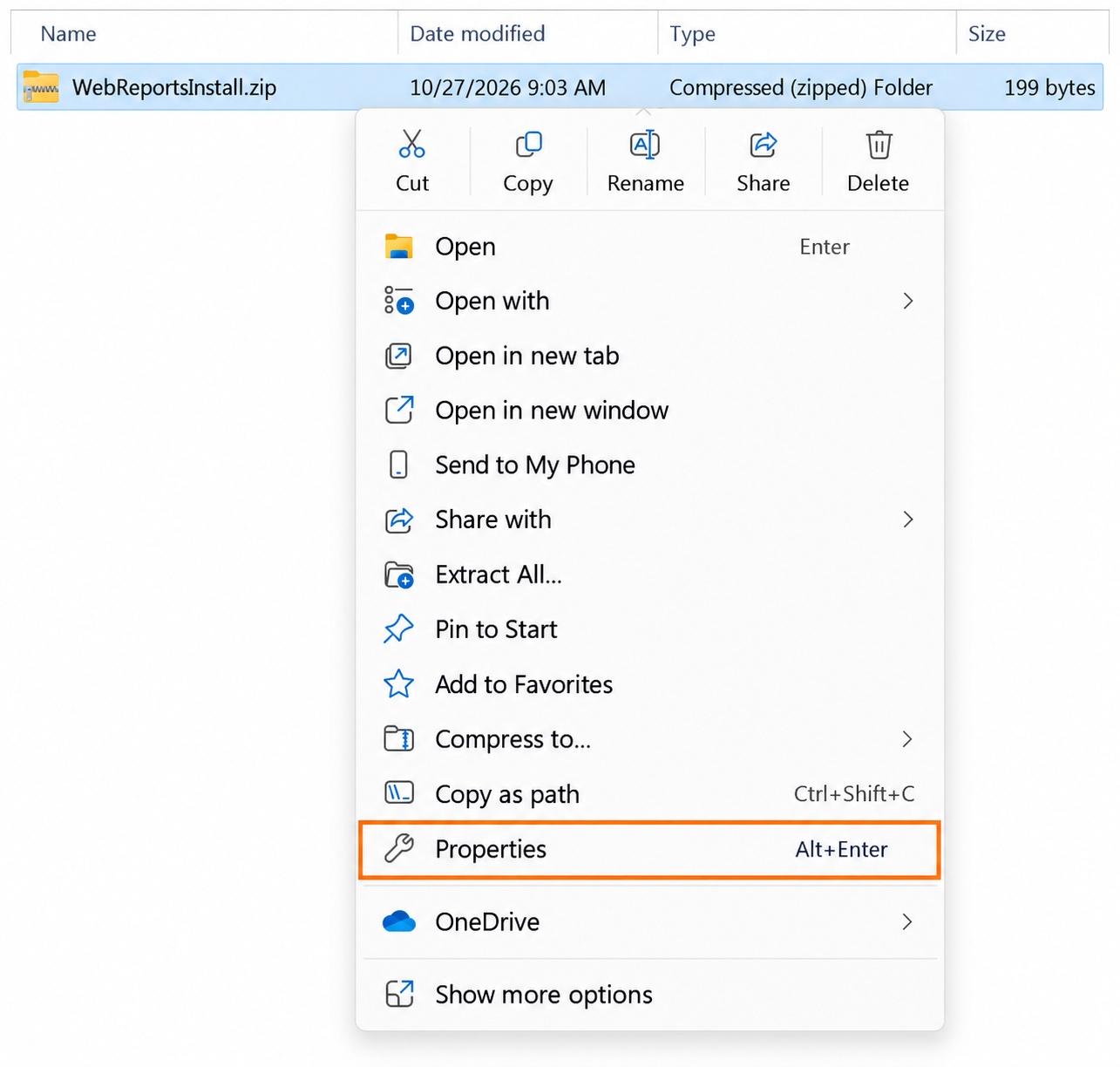
Demo illustration: open Properties for the downloaded ZIP. The callout identifies the Properties command in the current captured menu.
2. Select Unblock and Save the Change
- In Properties, select the General tab.
- Find the Security message near the bottom: This file came from another computer and might be blocked to help protect this computer.
- If Unblock is available, select its checkbox.
- Click Apply, then OK.
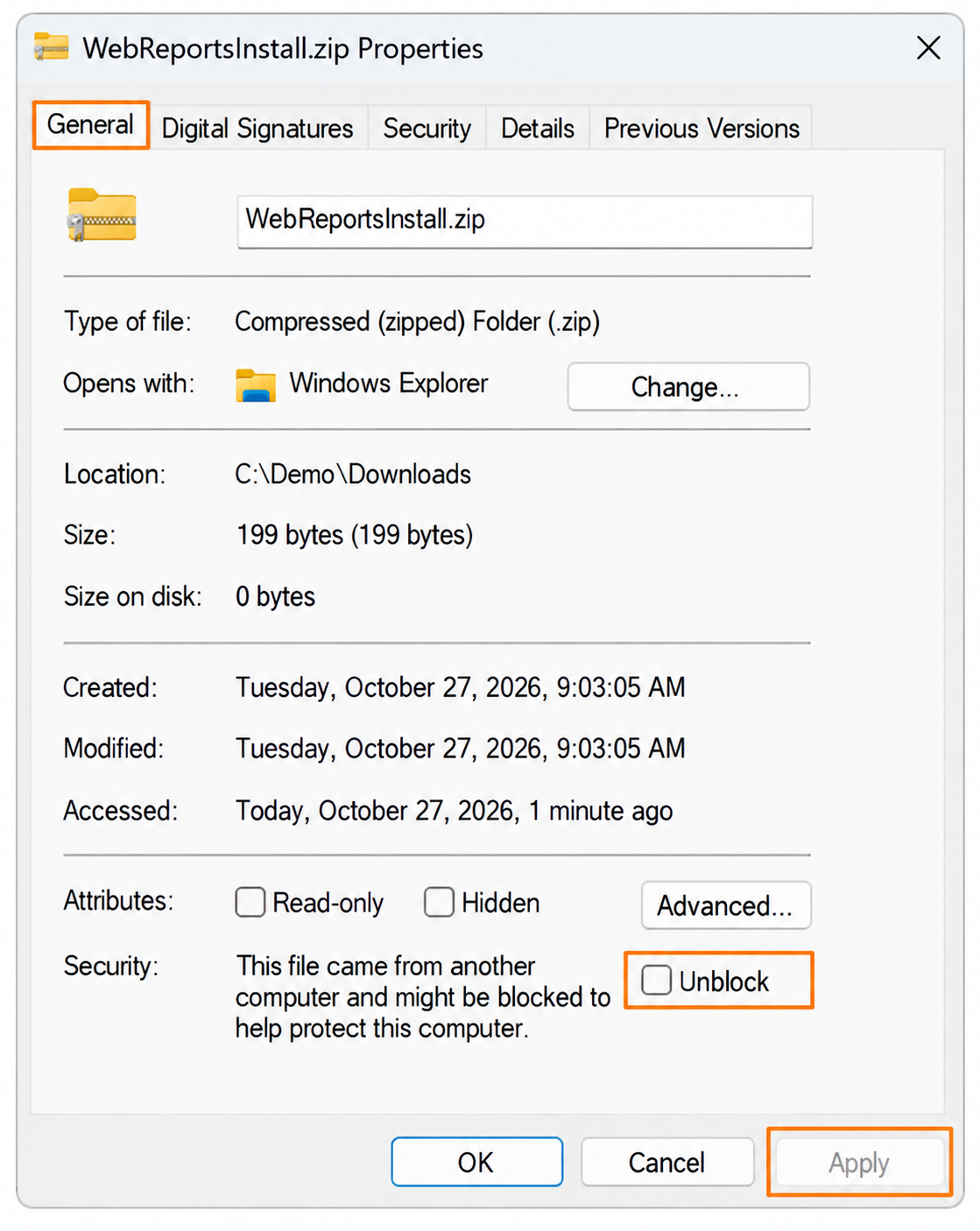
Demo illustration before the change: select Unblock, then use Apply to save it. Apply is gray in this initial state because no change has been made yet.
If Unblock Is Not Displayed
There is no Unblock action available in this dialog when the checkbox is absent. The ZIP may already be unblocked or may not have retained internet-origin information. Continue with extraction if Windows is not reporting a blocking problem.
If Windows still reports a blocked file, confirm that you opened Properties for the downloaded ZIP itself and ask the deployment administrator to review the file and applicable policies.
3. Verify Before Extracting
After saving the change, reopen the ZIP's Properties → General tab. The internet-origin Security message and Unblock option normally no longer appear after the marker is removed.
If Unblock remains available, confirm the change was saved with Apply. Resolve any permission or policy error with the deployment administrator before continuing.
If you already extracted the package and the extracted files are blocked, unblock the trusted ZIP first and extract a fresh copy into a separate staging folder. For an existing installation, follow the update guide before replacing live files.
Next Steps
Extract the prepared ZIP to a staging folder and continue with the appropriate procedure:
- Installing WebReports on Windows for a new deployment.
-
Update WebReports to the Latest Version for an existing deployment, including preserving its current
appsettings.json.
For background on the internet-origin marker, see Microsoft's Unblock-File documentation. The steps above use the File Explorer interface.
Comments
0 comments
Please sign in to leave a comment.